


Massive Software announces Massive 6.0 crowd simulation software
Massive 6.0
New look, new GUI
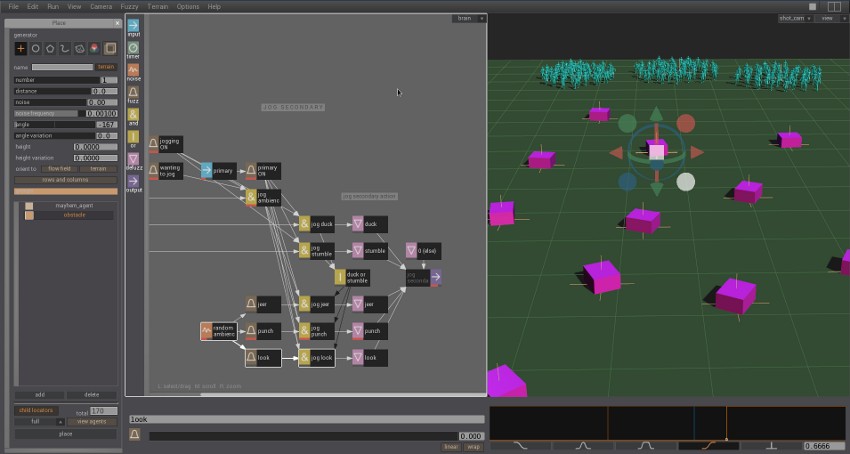
Massive has a completely new graphic user interface. With graphic design by Lost in Space the new interface not only looks stylish and modern but provides a much smoother interactive user experience. Dialog windows and editors now turn up in the new side panel, keeping the workspace clear and tidy. The main window now hosts multiple panels that can be configured to suit the users needs, and the configurations can be recalled for later use. Since any panel can be a viewport it’s now possible to have up to 5 viewports open at once, each using a different camera.
3D placement
The existing placement tools in Massive have been extended to work in 3 dimensions, independently of the terrain. The point generator can be placed anywhere in space, the circle generator becomes a sphere, the polygon generator gains depth, the spline generator becomes tubular. There’s also a new generator called the geometry generator, which takes a wavefront .obj file and fills the polygonal volume with agents.
Auto action import
Building complex agents with hundreds of actions can be a time consuming process, but it doesn’t have to be anymore. In Massive 6.0 the action importing process can be completely automated, reducing what could be months of work to a few minutes. Also, all of the import settings for all of the actions can be saved to a file so that revisions of source motion can be imported in seconds using the same settings as earlier revisions.
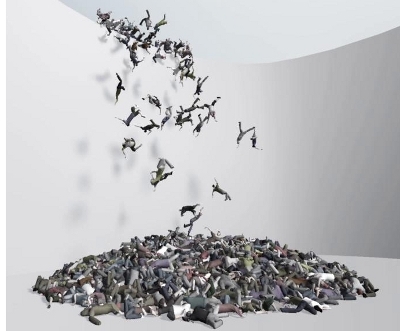
Bullet dynamics To effortlessly build a mountain of zombies it would be useful to have extremely stable rigid body dynamics. Massive 6.0 supports bullet dynamics, significantly increasing dynamics stability. Just for fun we had 1000 mayhem agents throw themselves off a cliff into a pile on the ground below. Without tweaking of parameters we easily created an impressive zombie shot, demonstrating the stability and ease of use of bullet dynamics. No typing required While it is possible to create almost any kind of behaviour using the brain nodes in Massive, it has always required a little typing to specify inputs and outputs of the brain. This is no longer necessary with the new channel menu which allows the user to very quickly construct any possible input or output channel string with a few mouse clicks. These are just some of the new features of Massive 6.0, which is scheduled for release in September. |
Massive for Maya
Massive has always been a standalone system, and now there’s the choice to use Massive standalone as Massive Prime and Massive Jet, or in Maya as Massive for Maya.
Set up and run simulations in Maya
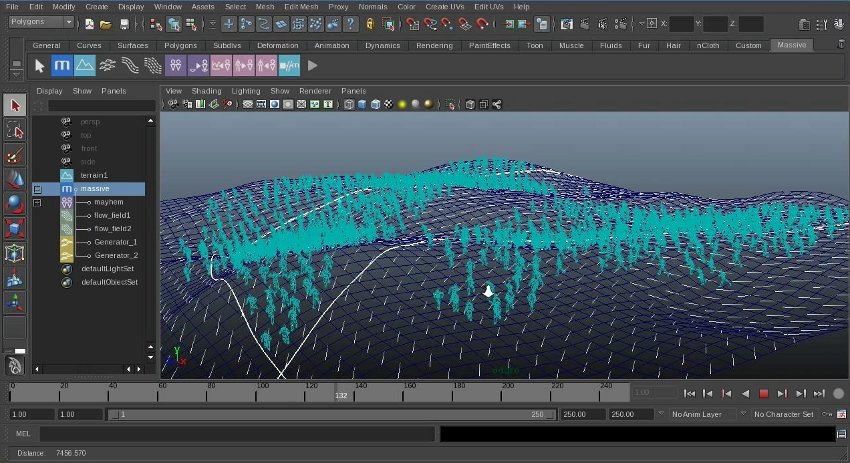
Massive for Maya facilitates the creation of Massive silmuations directly in Maya. All of the Massive scene setup tools such as flow field, lanes, paint and placement editors have been seamlessly reconstructed inside Maya. The simulation workflow has been integrated into Maya to allow for intuitive running, recording and playback of simulations. To achieve this a record button has been added next to the transport controls and a special status indicator has been included in the Massive shelf. Scrubbing of simulations of thousands of agents in Maya is now as simple and efficient as scrubbing the animation of a single character.
Set up lighting in Maya
The Massive agents automatically appear in preview renders as well as batch renders alongside any other objects in the scene. Rendering in Maya works for Pixar’s RenderMan, Air, 3Delight, Mental Ray and V-Ray. This allows for lighting scenes using the familiar Maya lighting tools, without requiring any special effort to integrate Massive elements into the scene. Furthermore, all of this has been achieved without losing any of the efficiency and scalability of Massive.
Edit simulations in Maya graph editor
Any of the agents in a simulation can be made editable in the Maya graph editor. This allows for immediate editing of simulations without leaving the Maya environment. Any changes made to the animation in the graph editor automatically feed back to the Massive agents, so the tweaked agents will appear in the render even though the user sees a Maya character for editing purposes in the viewport. The editing process can even be used with complex animation control rigs, allowing animators and motion editors complete freedom to work however they want to.
|
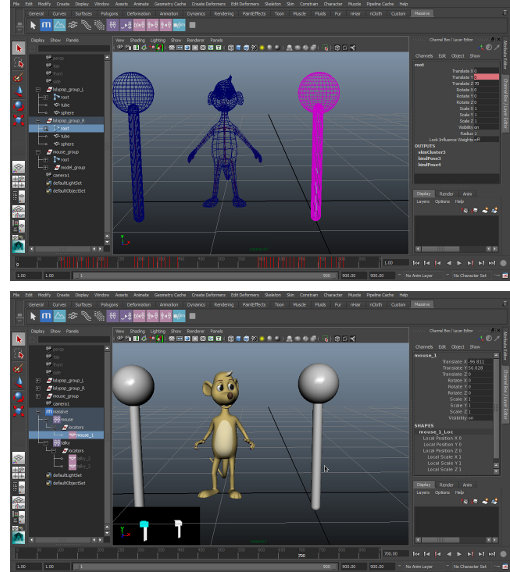
A major advantage of Massive for Maya is the ability to bring Massive’s famous brains to character animation, providing another vital tool for creating the illusion of life. While animation studios have integrated Massive into their pipeline to do exactly this for years, the ability to create directable characters has not been within easy reach for those using off-the-shelf solutions. With Massive for Maya it’s now possible to create characters using a handful of base cycles, takes and expressions that can handle such tasks as keeping alive, responding to the the focus of the shot, responding to simple direction, or simply walking along a path, thus reducing the amount of work required to fill out a scene with characters which are not currently the focus of the shot. For example, in a scene in which two characters are talking with eachotherand a third character, say a mouse, is reacting, the mouse could be driven by it’s Massive counterpart. The talking characters would drive their Massive counterparts thereby being visible to the mouse. Using attributes in the talking characters, their Massive counterparts could change colour to convey their emotional states to the mouse agent. The mouse agent then performs appropriately, using it’s animation cycles, blend shape animations etc in response to the performance of the talking characters, and looking at whichever character is talking. Once the agents for a project have been created, setting up a shot for this technique requires only a few mouse clicks and the results happen in real-time. Any edits to the timing of the shot will simply flow through to the mouse performance. |
 Directable characters
SCANable offers on-site 3D imaging of real-world people/characters to populate your 3D crowd asset library in Massive’s crowd placement and simulation software. Contact us today for a free quote.


Leave a Reply
Want to join the discussion?Feel free to contribute!